What are functions?
Functions allow you to extend the capabilities of a language model by defining reusable, server-side logic that the model can call when appropriate. Open WebUI functions are a lightweight and tightly integrated mechanism: they live directly inside your Open WebUI instance and are written as small Python snippets. The full documentation for functions is available here.
There are three types of functions you can use:
- Pipe functions: With a pipe function, you create your own custom models or agents. With a pipe you can set up a complex workflow, potentially combining different models. The pipe function will appear as a separate model in the UI.
- Filter function: With a filter function, you can modify the input before it gets send to the model, or modify the output before it is returned to the user. The filter function can be enabled for specific models, or globally.
- Action function: With an action function, you create custom buttons underneat the chat interface, with which users can trigger specific actions.
In this section, you will learn how to add functions to Open WebUI, and how to enable them in a chat. In the next section, you will build your own Open WebUI function for an agentic coding framework.
Filter functions
Each of the different function types has it’s own structure, which is described in the documentation. Here, we will discuss the filter function, while in the next section you will work with pipe functions. The filter function base template is structured as follows:
from pydantic import BaseModel
from typing import Optional

class Filter:
    # Valves: Configuration options for the filter
    class Valves(BaseModel):
        pass

    def __init__(self):
        # Initialize valves (optional configuration for the Filter)
        self.valves = self.Valves()

    def inlet(self, body: dict) -> dict:
        # This is where you manipulate user inputs.
        print(f"inlet called: {body}")
        return body

    def stream(self, event: dict) -> dict:
        # This is where you modify streamed chunks of model output.
        print(f"stream event: {event}")
        return event

    def outlet(self, body: dict) -> None:
        # This is where you manipulate model outputs.
        print(f"outlet called: {body}")
A filter contains the following components:
- Valves: Valves are the settings of a filter, that a user can configure.
- Inlet: the inlet function allows you to modify the user input, for example adding more context or sanitiziation.
- Stream: the stream function intercepts individual chunks of the model output, allowing you to modify them in real-time.
- Outlet: the outlet function is the last part of the pipeline, enabling you to adjust the final LLM output.
Adding your function to Open WebUI
We will now add a filter function to our Open WebUI instance, which filters the user input for Private Personal Information (PPI). Below, you will find the instructions for adding and using the filter, and the python code for the filter. The code is explained in detail in the additional information.
We start by adding our function to our Open WebUI instance. This is done through the admin panel, where all the settings are.
- In your Open WebUI instance, go to
admin panel->functions. In the top right, click on+ New Function.- Give the function a name (e.g. “PPI filter) and a description. Then remove the template code that is automatically there, and copy-paste the function below, which is collapsed as show filter code as the code. Then, save the function.
- From the
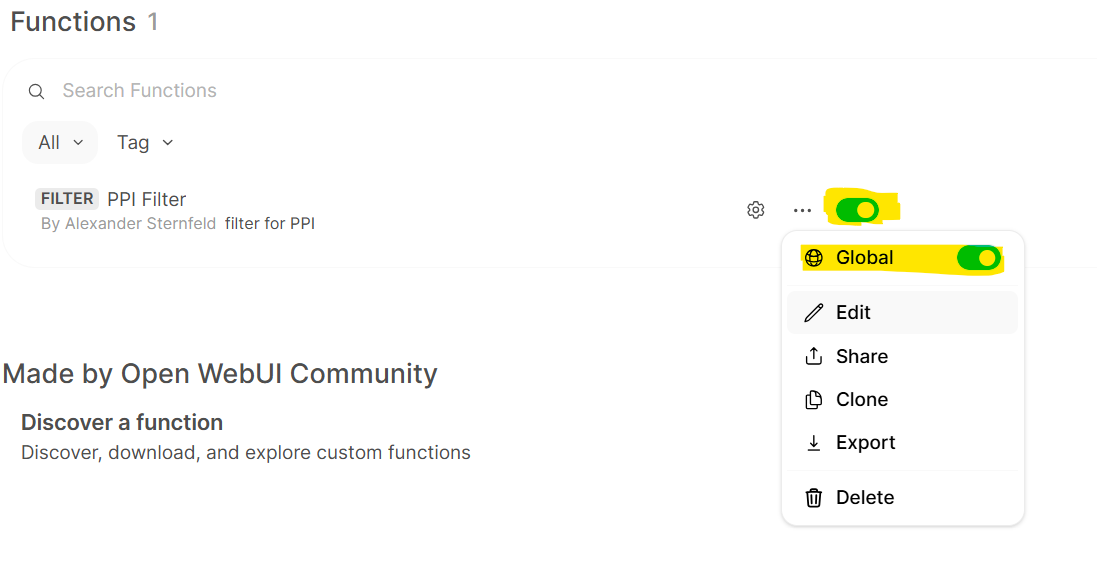
functionstab in theadmin panel, make sure that the function is toggled on.Then, by click on the•••to also enable it globally (see image below).
Show filter code
import re
from pydantic import BaseModel
from typing import Optional, Set

SENSITIVE_PATTERNS = {
    "API key": re.compile(r"(api[_-]?key\s*[:=]\s*[A-Za-z0-9_\-]{16,})", re.IGNORECASE),
    "Private key": re.compile(
        r"-----BEGIN (?:RSA |EC |DSA )?PRIVATE KEY-----[\s\S]*?(?:-----END (?:RSA |EC |DSA )?PRIVATE KEY-----|$)",
        re.IGNORECASE,
    ),
    "AWS secret access key": re.compile(
        r"(aws[_-]?secret[_-]?access[_-]?key\s*[:=]\s*[A-Za-z0-9/+=]{40})",
        re.IGNORECASE,
    ),
}


class Filter:
    class Valves(BaseModel):
        pass

    def __init__(self):
        self.valves = self.Valves()
        self.detected_categories: Set[str] = set()
        self.toggle = True
        self.icon = """data:image/svg+xml,%3C%3Fxml%20version%3D%221.0%22%20encoding%3D%22iso-8859-1%22%3F%3E%0A%3C!--%20Uploaded%20to%3A%20SVG%20Repo%2C%20www.svgrepo.com%2C%20Generator%3A%20SVG%20Repo%20Mixer%20Tools%20--%3E%0A%3C!DOCTYPE%20svg%20PUBLIC%20%22-%2F%2FW3C%2F%2FDTD%20SVG%201.1%2F%2FEN%22%20%22http%3A%2F%2Fwww.w3.org%2FGraphics%2FSVG%2F1.1%2FDTD%2Fsvg11.dtd%22%3E%0A%3Csvg%20fill%3D%22%23000000%22%20height%3D%22800px%22%20width%3D%22800px%22%20version%3D%221.1%22%20id%3D%22Capa_1%22%20xmlns%3D%22http%3A%2F%2Fwww.w3.org%2F2000%2Fsvg%22%20xmlns%3Axlink%3D%22http%3A%2F%2Fwww.w3.org%2F1999%2Fxlink%22%20%0A%09%20viewBox%3D%220%200%20347.971%20347.971%22%20xml%3Aspace%3D%22preserve%22%3E%0A%3Cpath%20d%3D%22M317.309%2C54.367C257.933%2C54.367%2C212.445%2C37.403%2C173.98%2C0C135.519%2C37.403%2C90.033%2C54.367%2C30.662%2C54.367%0A%09c0%2C97.405-20.155%2C236.937%2C143.317%2C293.604C337.463%2C291.305%2C317.309%2C151.773%2C317.309%2C54.367z%20M162.107%2C225.773l-47.749-47.756%0A%09l21.379-21.378l26.37%2C26.376l50.121-50.122l21.378%2C21.378L162.107%2C225.773z%22%2F%3E%0A%3C%2Fsvg%3E"""

    def scrub_pii(self, text: str, track: bool = True) -> str:
        """Redact sensitive information from the text.

        Args:
            text: The text to scrub.
            track: If True, record detected categories for the user warning.
        """
        for label, pattern in SENSITIVE_PATTERNS.items():
            if pattern.search(text):
                if track:
                    self.detected_categories.add(label)
                text = re.sub(pattern, "[REDACTED]", text)
        return text

    async def inlet(
        self, body: dict, __event_emitter__, __user__: Optional[dict] = None
    ) -> dict:
        self.detected_categories = set()  # reset per request

        await __event_emitter__(
            {
                "type": "status",
                "data": {
                    "description": "Filtering PII",
                    "done": True,
                    "hidden": False,
                },
            }
        )

        # Silently scrub all previous messages without triggering a warning
        for message in body["messages"][:-1]:
            if message["role"] == "user" and isinstance(message["content"], str):
                message["content"] = self.scrub_pii(message["content"], track=False)

        # Scrub the latest message and track detections for the warning
        last_message = body["messages"][-1]
        if last_message["role"] == "user" and isinstance(last_message["content"], str):
            last_message["content"] = self.scrub_pii(
                last_message["content"], track=True
            )

        return body

    def outlet(self, body: dict, __user__: Optional[dict] = None) -> dict:
        if not self.detected_categories:
            return body

        categories = ", ".join(sorted(self.detected_categories))
        warning = (
            f"**⚠️ Sensitive information detected and redacted: {categories}.**\n\n"
        )

        body["messages"][-1]["content"] = warning + body["messages"][-1]["content"]

        return body
Now that we have set up the function, we can use it in chat!
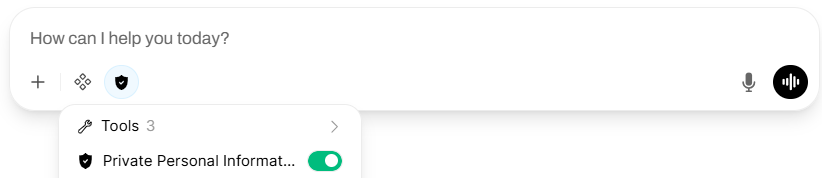
You can start a new chat, and enable the filter by hovering on the
integrationsbutton in the chat (see image below). You can try a few prompts to experiment with the functioning of the filter. Below are two examples you could try:Please explain to me what a private SSH key is, my SSH key is: -----BEGIN RSA PRIVATE KEY----- kjndaksjndkjskjsnfskjc dsI am setting up some code using the Kaggle API, I'm not sure how to request data from Kaggle. My API key is: api_key=dajksfieu34ndsadsae
Evaluating your filter
The filter above is a toy example intended to demonstrate the mechanics of Open WebUI filter functions — it is not a production-ready PPI solution. It only covers a handful of patterns (API keys, private keys, and AWS secrets) and misses many common categories of sensitive data such as email addresses, phone numbers, social security numbers, credit card numbers, or physical addresses. It also relies purely on regex matching, which can be brittle: slight formatting variations, obfuscation, or encoding tricks can easily bypass detection.
Try experimenting with the filter to find its blind spots. Can you get sensitive information past it by changing formatting or spacing? What types of personal data does it completely ignore? Thinking adversarially about filters like this is an important skill. How would you improve upon this first version?
What is next?
If you are done early, you can have a look at the additional exercises.
Author: Alexander Sternfeld